

How to Connect Your GoDaddy Domain to Earn Cashflow Now Sales Funnel A Step by Step Tutorial
If you want to make your Earn Cashflow Now sales funnel look more professional and trustworthy, connecting your own GoDaddy domain name is a smart move. This helps build credibility and makes it easier for your audience to remember your page. This tutorial will guide you through the process of linking your GoDaddy domain to your Earn Cashflow Now sales funnel page with clear, step-by-step instructions and helpful visuals.
By the end of this guide, you will have your domain properly connected and ready to drive traffic to your sales funnel.
DO NOT ATTEMPT TO DO THIS UNLESS YOU ARE COMFORTABLE WORKING WITH YOUR DOMAIN. WE WILL NOT BE AVAILABLE FOR TECHNICAL SUPPORT IF SOMETHING BECOMES BROKEN WITH YOUR PERSONAL GODADDY DOMAIN, OR ANY ATTACHED SERVICES. IF YOU HAVE ANY ISSUES OR FEEL YOU NEED HELP WITH THIS PROCESS, CONTACT YOUR GODADDY SUPPORT CHANNEL FOR ASSISTANCE.
PERFORMING THIS PROCESS WILL NOT BREAK OR EFFECT YOUR FUNNEL LINK NEGATIVELY. YOU WILL BE ABLE TO CONTINUE USING YOUR FUNNEL LINK EVEN IF YOU FAIL TO PROPERLY ATTACH YOUR PERSONAL DOMAIN.
What You Need Before You Start
Before diving into the setup, make sure you have the following ready:
A registered domain name with GoDaddy.
Access to your GoDaddy account dashboard.
Your Earn Cashflow Now sales funnel link.
Basic familiarity with domains, websites, and navigating account settings.
Having these ready will make the process smoother and faster.
Step 1. Log Into Your GoDaddy Account, then:

Step 2. Select Domains Management.

Step 3. Select Your Domain.

Step 4. Select DNS

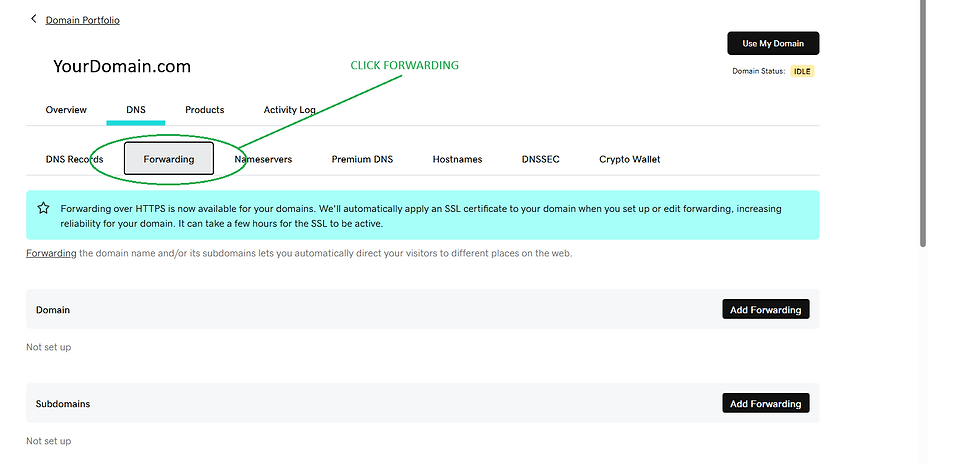
Step 5. Select Forwarding Option.
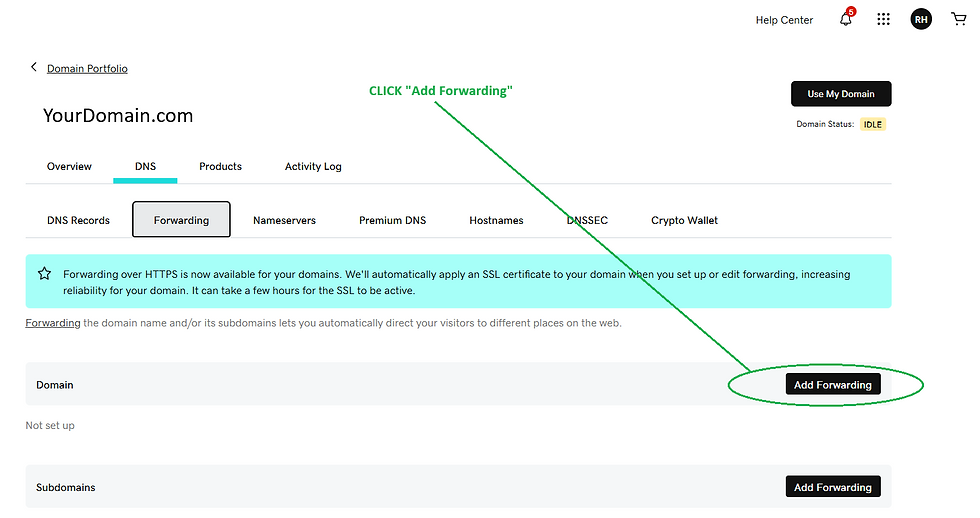
Step 6. Select the Add Forwarding Option
Step 7. Add Your Earn Cashflow Now Funnel Link.

Confirm your choices and Save.
PLEASE ALLOW 2 HOURS FOR THE FUNNEL PAGE TO GO LIVE ON YOUR DOMAIN.
Comments